You changed a page address, deleted an old product or moved the site to a new domain, and Search Console has started showing 404 errors while traffic drops. A URL redirect is what fixes that situation, and it usually takes a few minutes if you know where to set it up.
A URL redirect is a server instruction that automatically sends a visitor and Googlebot from an old URL to a new one. Use a 301 for a page moved permanently, a 302 for a temporary move, and a 410 with no redirect at all for a page whose content is gone and has no equivalent. On a WordPress site it takes one minute through a plugin; elsewhere it is a single line in .htaccess or the Nginx configuration.
Below: which code to choose, how to set up a redirect on the five most common platforms with ready-made lines, how to check that it works, and the three mistakes that cost rankings even when the redirect „works”.
Which redirect code to choose: 301, 302, 308 or 410?
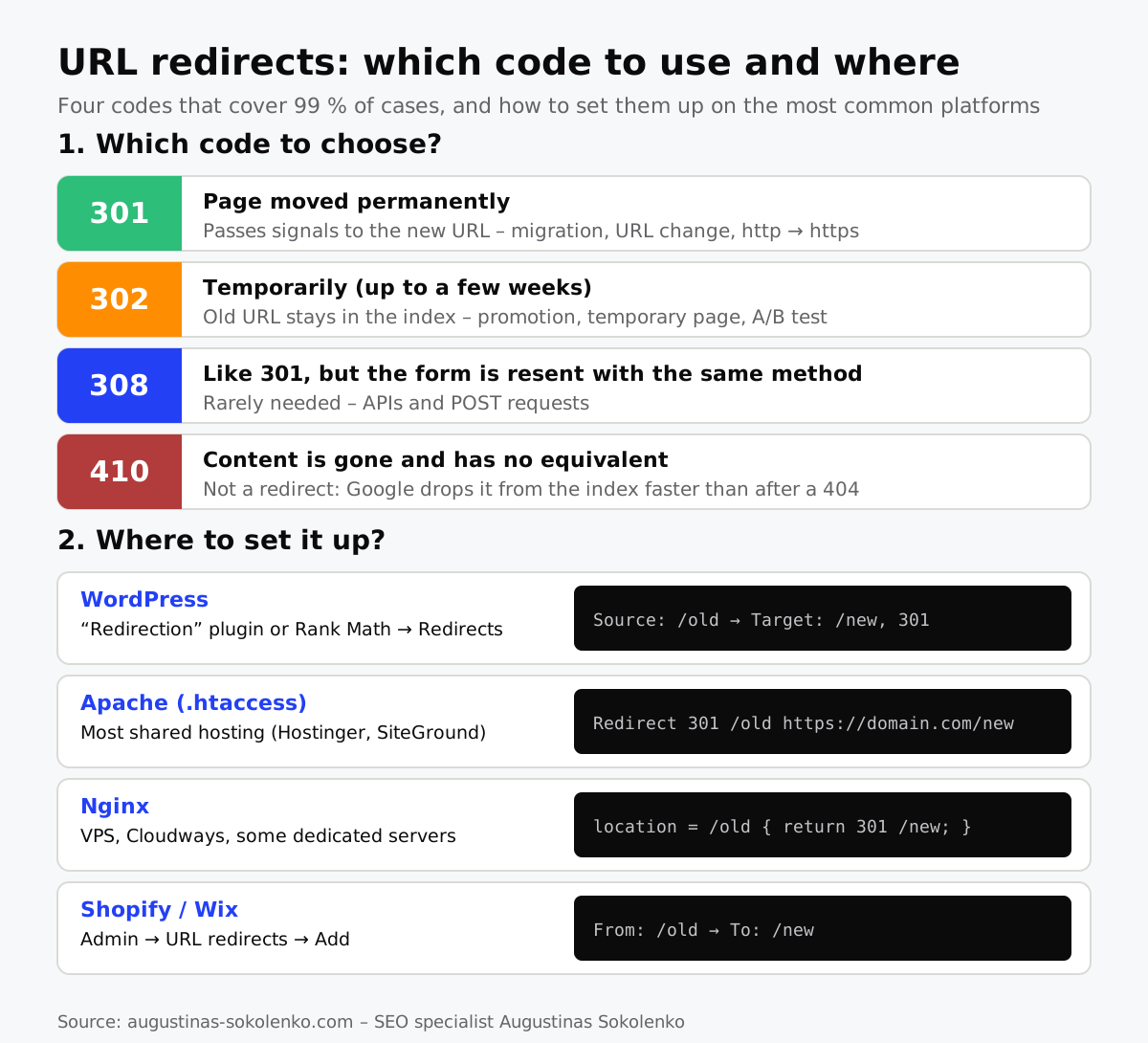
For most cases a 301 is right: it tells Google the page has moved permanently and passes its signals to the new address. Use a 302 only when the old address will genuinely come back, and a 410 when the content is gone and there is nothing to redirect to.
| Code | Meaning | When to use | What Google does |
|---|---|---|---|
| 301 | Moved permanently | URL change, migration, http → https, www / non-www | Treats the new URL as canonical, passes link signals |
| 302 | Moved temporarily | Promotion page, temporarily out-of-stock product, A/B test | Old URL stays in the index; the new one does not become canonical |
| 308 | Like 301, but keeps the request method (POST) | APIs, forms; practically never needed for websites | Treated like 301 |
| 307 | Like 302, keeps the method | Same, temporarily | Treated like 302 |
| 410 | Content removed | Discontinued product with no similar one, old article with no value | Dropped from the index faster than after a 404 |
According to Google’s documentation, 301 and 308 are treated as permanent, 302, 303 and 307 as temporary; server-side redirects are the ones Google interprets most reliably, while JavaScript or meta refresh redirects are recommended only as a last resort.
The decision rule I apply on client sites: if you are torn between 301 and 302, choose 301. The most common mistake in practice is the opposite: a plugin writes a 302 by default, the page is moved permanently, and Google keeps the old URL in the index for months without transferring the signals.
How to redirect a URL on a WordPress site
On a WordPress site the fastest way is the SEO plugin you already have: Rank Math (the Redirections module is free) or Yoast SEO Premium. If you use a different SEO plugin, install the free Redirection plugin.
Steps with Rank Math: Rank Math → Redirections → Add New. In „Source URL” enter the old path without the domain (/old-product), in „Destination URL” the full new address, choose 301 and save. With the Redirection plugin the same fields are under Tools → Redirection.
Three things worth knowing:
- Source URL without the domain, destination with it.
/old-product→https://yoursite.com/new-product. If the source is entered with the domain, some plugins never apply the rule (what an address consists of is covered in my article on what a URL is). - WordPress redirects changed slugs on its own, but only for posts and pages whose permalink you changed in the editor, and only while the post exists. A deleted page needs a manual rule.
- For bulk moves (e.g.
/blog/2023/article→/articles/article) use a Regex rule: source^/blog/\d{4}/(.*)$, destination/articles/$1. One rule replaces hundreds of entries.
How to redirect a URL with .htaccess (Apache)
If the site is not WordPress, or you want the redirect to work independently of plugins, the rule goes into the .htaccess file in the site’s root directory. This works on most shared hosting (Hostinger, SiteGround, Bluehost and the like), because they run Apache.
A single page – one line:
Redirect 301 /old-page https://yoursite.com/new-pageMoving a whole domain while keeping the paths (old.com/page → new.com/page):
RewriteEngine On
RewriteCond %{HTTP_HOST} ^(www\.)?old\.com$ [NC]
RewriteRule ^(.*)$ https://new.com/$1 [R=301,L]
HTTP → HTTPS and www → non-www in one block (the most common situation, when a site answers on four addresses):
RewriteEngine On
RewriteCond %{HTTPS} off [OR]
RewriteCond %{HTTP_HOST} ^www\. [NC]
RewriteRule ^ https://yoursite.com%{REQUEST_URI} [R=301,L]
Back up .htaccess before editing it: one syntax error and the whole site returns a 500 error. Put your rules at the top of the file, above the # BEGIN WordPress block, otherwise WordPress overwrites them when it refreshes permalinks.
How to redirect a URL on an Nginx server
On Nginx .htaccess does not work – rules go into the site’s configuration file (usually /etc/nginx/sites-available/yoursite.com) inside the server block, and the server is reloaded afterwards.
A single page:
location = /old-page {
    return 301 https://yoursite.com/new-page;
}
A whole domain:
server {
    server_name old.com www.old.com;
    return 301 https://new.com$request_uri;
}
After the change: nginx -t checks the syntax, systemctl reload nginx applies it. If the site is hosted on Cloudways, Kinsta or a similar platform, redirects are usually set in their control panel rather than in a file – it is the same Nginx, just with an interface.
Redirects on e-commerce platforms
On closed platforms a redirect is set in the admin panel with no code: each has a section with „From” and „To” fields.
- Shopify: Online Store → Navigation → URL Redirects → Create URL redirect. Supports CSV import for bulk moves. The code is always 301.
- Wix: Settings → SEO → URL Redirect Manager → New Redirect; also supports bulk import.
- BigCommerce: Settings → 301 Redirects; old path without the domain.
- WooCommerce: it is WordPress, so the plugin section above applies; deleted products are pointed to their category with the same Rank Math rule.
When moving a shop to another platform the hardest part is not the setup but the URL mapping table: every old product and category URL with its assigned new one. According to Google’s site move guidelines, it should be prepared before the move, a new sitemap submitted afterwards, and the redirects kept for at least a year. That is work I do in every migration SEO audit: old URLs are exported from Search Console and Screaming Frog, not from memory.
How to check that a redirect works correctly
Check a redirect not in the browser but with a tool that shows the HTTP code: a browser will take you to the new page after a 302 and after a three-step chain alike, whereas you need to see a single 301 straight to the final address.
- httpstatus.io – paste the old URL (up to 100 at a time) and you see the code and the full chain. The correct result:
301 → 200, one hop. - Screaming Frog – crawl the site and the report „Reports → Redirects → Redirect Chains” shows every chain and loop. The free version crawls up to 500 URLs.
- Search Console – under „Indexing → Pages”, the status „Page with redirect” shows that Google has already picked up the redirect; the 404 list should no longer contain pages you created rules for.
If you are redirecting a whole domain, also submit a change of address in Search Console (Settings → Change of address). It is needed only for a domain or subdomain change – not for http → https and not for www changes.
Three mistakes that cost rankings even with a working redirect
A redirect can work technically and still lose rankings if it leads to the wrong place, forms a chain or sends everything to the homepage.
Chains and loops
A chain appears when an old URL leads to another old one, and that one to the new (A → B → C): after a few site restructurings this is common. Every hop slows the page and crawling; fix it so that every old URL leads straight to the final one (A → C, B → C). A loop (A → B → A) blocks the page entirely – the browser shows „Too many redirects”, usually because of conflicting www / https rules in a plugin and in .htaccess.
Everything to the homepage
Pointing a hundred deleted products at the homepage is quick, but Google often treats such a redirect as a „soft 404” and passes no signals. The rule: product → the closest product or its category; article → the closest article on the topic; if there is no equivalent – 410.
Forgetting to update internal links
A redirect protects you from external links and old index entries; it is not a substitute for internal links. Menu, footer and in-article links should point straight to the new URLs – otherwise every visitor and crawler takes an extra hop. The Screaming Frog filter „Response Codes → Redirection (3xx)” with the „Inlinks” column shows which of your pages still link to redirected addresses.
Frequently asked questions
How long should a 301 redirect be kept?
At least a year, and indefinitely if the old URL has external links. Google’s guidelines name a minimum of one year, during which the signals are transferred to the new address; for visitors arriving from old links the redirect is useful for as long as those links exist.
Does a 301 redirect lose link value?
Under Google’s current position a 301 redirect does not lose link signals – the new URL inherits the old one’s. In practice rankings still fluctuate for a few weeks after a migration while Google recrawls and reindexes the pages.
What is the difference between a redirect and a canonical tag?
A redirect physically sends the visitor to another URL, whereas rel="canonical" only tells Google which of several similar pages is the main one, while the visitor stays where they arrived. A removed or moved page needs a redirect; two similar pages that exist at the same time (filter variants, for example) need a canonical.
Can you redirect to another domain?
Yes, a 301 to another domain works the same way as within one: every old URL should lead to its matching new one. Additionally, submit a change of address in Search Console and verify both domains – Google then processes the move faster.
What to do if the site shows „Too many redirects” after a redirect?
That is a loop: two rules point at each other. The most common cause is an https or www rule set in the hosting panel, in .htaccess and in a plugin at the same time. Keep it in one place (ideally at server level), disable the others and clear the cache.
Should deleted articles be redirected?
Only if the article had traffic or external links and there is a close page to send it to. For an article with no traffic and no equivalent it is better to return a 410 – Google drops it from the index and you do not burden the site with pointless rules.