You published a new service page or blog post, yet Google still hasn’t picked it up weeks later? Often the reason is simple: the search engine doesn’t know the URL exists yet.
A sitemap is a file or page that lists the most important URLs on a website. An XML sitemap is written for search engine crawlers and helps them find new and updated pages faster, while an HTML sitemap helps visitors find their way around. A sitemap doesn’t guarantee indexing or boost rankings, but it reduces the chance that an important page goes unnoticed.
Below you’ll find how a sitemap works, when you really need one, what to include and how to submit it through Google Search Console.
How does an XML sitemap work?
An XML sitemap is a machine-readable list of URLs with extra information about each page. A crawler reads it and gets a clear signal about which addresses are worth crawling.
The simplest file looks like this:
<?xml version="1.0" encoding="UTF-8"?>
<urlset xmlns="http://www.sitemaps.org/schemas/sitemap/0.9">
  <url>
    <loc>https://www.yourwebsite.com/services/seo-audit/</loc>
    <lastmod>2026-10-10</lastmod>
  </url>
</urlset>
The key elements:
<loc>– the full, absolute URL of the page, includinghttps://;<lastmod>– the date of the last significant content change;<priority>and<changefreq>– older fields that, according to Google’s documentation, Google ignores.
Google uses <lastmod> only when the date is consistently accurate. If a plugin stamps today’s date on every page each night, the signal quickly loses its value. The date should change only when the main content, structured data or links change, not when you update the year in the footer.
Sitemap index and multiple sitemaps
A single XML sitemap can hold up to 50,000 URLs or 50 MB (uncompressed). Larger sites use several files plus a list of them – a sitemap index. For example, WordPress with Yoast SEO creates sitemap_index.xml, which groups posts, pages and categories into separate sitemaps. This split is handy for smaller sites too: the Search Console report shows at a glance which type of page is being indexed less well.
What is the difference between an XML and an HTML sitemap?
An XML sitemap is a technical file for crawlers, while an HTML sitemap is a normal page of links for people. One doesn’t replace the other.
| Criterion | XML sitemap | HTML sitemap |
|---|---|---|
| Audience | Search engine crawlers | Website visitors |
| Format | .xml file, e.g. /sitemap.xml | A regular page with a list of links |
| Contents | URLs, <lastmod>, sometimes images, videos, language versions | Main sections and pages grouped by topic |
| SEO benefit | Faster discovery of new and updated pages | Extra internal links, easier navigation |
| Required? | Recommended for most business websites | Useful for large sites with complex structures |
For most service businesses and online shops, an XML sitemap plus a clear menu is enough. An HTML sitemap is worth building when a site has hundreds of categories or an organisation has to meet accessibility requirements.
Does your website need a sitemap?
For most business websites, yes – it takes a few minutes to set up and keeps paying off. Google says small sites (about 500 pages or fewer) whose pages are well linked may not need one, but in practice even a 20-page site often fails the „well linked” test.
A sitemap matters most if:
- The site is new and has almost no external links, so crawlers have nothing to latch on to.
- Content changes often: online shops, news portals, blogs.
- Some pages have no internal links, such as ad landing pages or old articles buried in the archive.
- The site is multilingual – a sitemap can declare how language versions relate to each other (more on this below).
- The site has lots of images or videos you want to appear in Google Images and video results.
The decision rule is simple: if at least one point applies, create a sitemap and submit it. If your site has five pages, all reachable from the menu, a sitemap won’t hurt, but it won’t work miracles either.
What should you include in a sitemap, and what should you leave out?
Only include pages you want to see in search results. Every junk URL sends a mixed signal and wastes the crawler’s time.
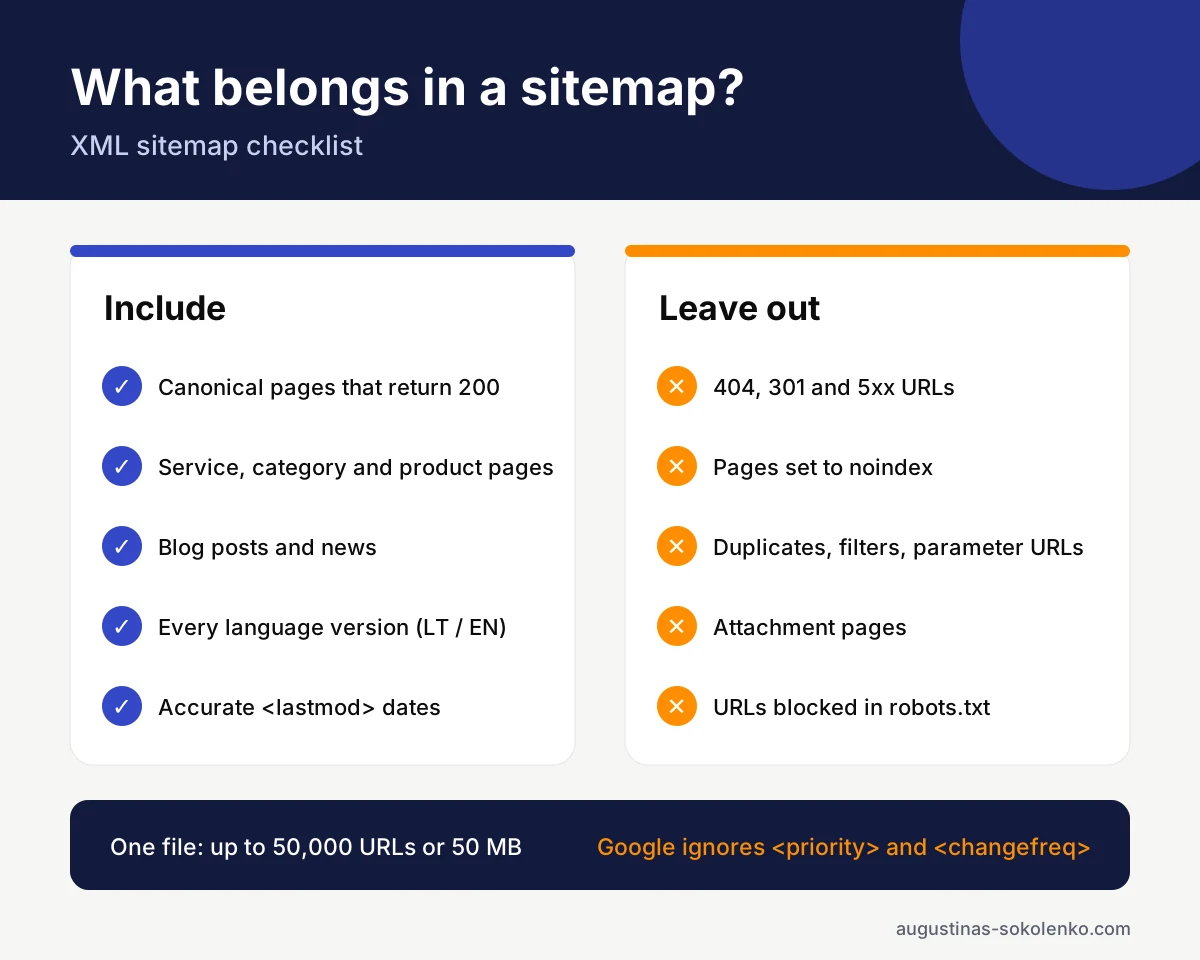
Include canonical pages that return a 200 status code: services, categories, products, articles. Leave out redirected (301) and missing (404) pages, pages set to noindex, filter and search result URLs with parameters, duplicates and addresses blocked in your robots.txt file.
WordPress attachment pages are a special case. Every uploaded image can get its own page with no text, and some settings add these pages to the sitemap. They add nothing to your indexing, so check that your sitemap doesn’t contain them.
Multilingual websites: hreflang in the sitemap
If your site has, say, Lithuanian and English versions, the sitemap can declare which pages are translations of each other. This is done with the xhtml:link element and the hreflang attribute. Google’s guidelines list it as one of three equivalent ways to specify language versions. The sitemap method is convenient because you don’t need to change the code of every page.
How do you create a sitemap?
Most modern platforms generate a sitemap automatically – you just need to find it and check it.
- WordPress: since version 5.5, the core creates
/wp-sitemap.xml. Installing Yoast SEO or Rank Math replaces it with a more flexible/sitemap_index.xml, where you can switch off unnecessary content types. - Shopify and Wix:
/sitemap.xmlis generated automatically and updates when you add a product or page. - Custom-built websites (e.g. Next.js): the sitemap is generated in code from the database or CMS, so new pages are added without manual work.
- Online generators only suit a one-off sitemap for a small static site. Whenever the content changes, you’d have to rebuild the file.
Once the sitemap exists, open it in your browser and spot-check 5–10 URLs: do they load, and are there any old, test or duplicate addresses?
How do you submit a sitemap to Google?
The most reliable way is Google Search Console. Submitting a sitemap is a hint, not a command, but only there can you see whether Google has read the file and how many URLs it found.
- In Search Console, select your property and open the Sitemaps report.
- Enter the sitemap address, e.g.
sitemap_index.xml, and click Submit. - After a few days, check the status and the number of discovered URLs.
- Also add the line
Sitemap: https://www.yourwebsite.com/sitemap_index.xmlto your robots.txt file so other search engines can find it too.
The old „ping” method, where you notified Google through a special URL, no longer works: Google retired it in 2023. You can submit your sitemap to Bing through Bing Webmaster Tools.
What the Search Console report tells you
The status Couldn’t fetch usually means the file doesn’t load, returns an error, or is blocked by robots.txt or server security. If you submitted 300 URLs and 120 are indexed, the sitemap is working – the problem lies with the pages themselves. In that case, check the Pages report: the status Discovered – currently not indexed means Google knows the URL but hasn’t yet seen a reason to crawl it, often because of thin content or missing internal links.
The most common sitemap mistakes
The same sitemap issues come up again and again in SEO audits, and most of them appear after a site migration or redesign.
- Old URLs after a migration. The sitemap still lists addresses from the previous site that now redirect or return 404.
- Canonical version mismatch. The sitemap uses
http://or nowwwwhile the site runs onhttps://www., or the trailing slash differs. - Staging URLs.
dev.orstaging.addresses end up in the sitemap. - Sitemap blocked in robots.txt or password-protected, so crawlers can’t read it.
- The same
<lastmod>date on every page, which leads Google to ignore the field. noindexpages in the sitemap – you’re asking Google to index and not index a page at the same time.
If Search Console shows lots of unindexed pages and the cause isn’t clear, you can book a free 15-minute SEO strategy call to talk through your situation.
Frequently asked questions
Does a sitemap improve Google rankings?
Not directly. A sitemap helps crawlers find pages, but rankings depend on content quality, relevance to the query and authority signals. The indirect benefit is that new and updated pages reach search results sooner.
Where can I find my website’s sitemap?
It’s usually at /sitemap.xml, /sitemap_index.xml or /wp-sitemap.xml. If none of these work, open /robots.txt – it normally contains a Sitemap: line with the exact link.
How often should a sitemap be updated?
Every time you add, remove or significantly change a page. Platforms with automatic generation handle this on their own, so a monthly look at the Search Console report is enough.
Do I need to resubmit the sitemap after every change?
No. Google re-crawls a submitted sitemap periodically on its own. Resubmit only if the sitemap address changes, for example when switching from wp-sitemap.xml to sitemap_index.xml.
Does a sitemap help with AI search?
Indirectly. Systems that generate AI answers often rely on search engine indexes, so faster and more complete indexing increases the chance that your page gets used. There’s a separate file designed for AI tools, llms.txt, but it doesn’t replace a sitemap.