Almost every SEO audit I run ends with the same note: dozens or hundreds of images without alt text. Most site owners know it „should be filled in”, but not what to write in it, or when not to write anything at all.
Alt text (alternative text) is the HTML alt attribute that describes in words what an image shows. Screen readers, Google and AI systems read it, and the browser displays it in place of the image when the file fails to load. A good rule: 5–15 words that say what you see, and nothing more.
In this article I explain what alt text looks like in code, who it is really for, which four questions decide what to write (and when to leave it empty), how it differs from the file name and caption, how to find missing alt text on your site, and what the new accessibility law says about it.
What is alt text in plain terms?
Alt text is one part of the HTML <img> tag: <img src="ankle-boots.jpg" alt="Brown leather women's ankle boots with 5 cm heel">. A sighted visitor never notices it; everyone else reads it instead of the image.
Alt text has four different „readers”, and it means something slightly different to each:
- Screen readers. For people with visual impairments, the software reads the alt text aloud. If there is none, it reads the file name: „IMG underscore four eight two one dot jpg”.
- Google. According to Google’s documentation, alt text is the most important attribute for image metadata: together with the page text and computer vision it helps Google understand what is shown and surface the image in Google Images.
- AI systems. ChatGPT, Perplexity and Google’s AI Overviews read a page as text. An image without alt text is a blank to them; with alt text it is one more fact about the page.
- The browser. When an image fails to load (slow connection, deleted file), the alt text is displayed in its place.
Two similar terms are worth separating. Alt tag and alt attribute are the same thing, though the second is technically correct, because alt is an attribute of the <img> tag rather than a tag of its own. Alt text is what sits inside the quotation marks.
How does alt text differ from the file name, title and caption?
Alt text describes the image to those who cannot see it; the file name, the title attribute and the caption under the image do different jobs and do not replace one another.
| Element | What it is | Who sees it | What to write |
|---|---|---|---|
Alt text (alt) |
Image description in the code | Screen readers, Google, AI, a browser without the image | What you see, 5–15 words |
| File name | brown-leather-ankle-boots.jpg |
Google (via the image URL) | 2–5 hyphenated words, no special characters |
| Title attribute | Tooltip that appears on hover | Visitors with a mouse | Usually nothing – Google does not weigh it, screen readers handle it inconsistently |
| Caption | Text under the image | All visitors | Context the image itself lacks: who, where, when |
| Image sitemap | XML list of images for Google | Bots only | Generated automatically by an SEO plugin |
The most common mistake I see on WordPress sites: a plugin copies the file name into the alt field automatically, and the whole site ends up with alt texts like „DSC_0231” or „banner-final-v2”. Formally the attribute is filled; in practice it is empty.
How to decide what to write: four questions
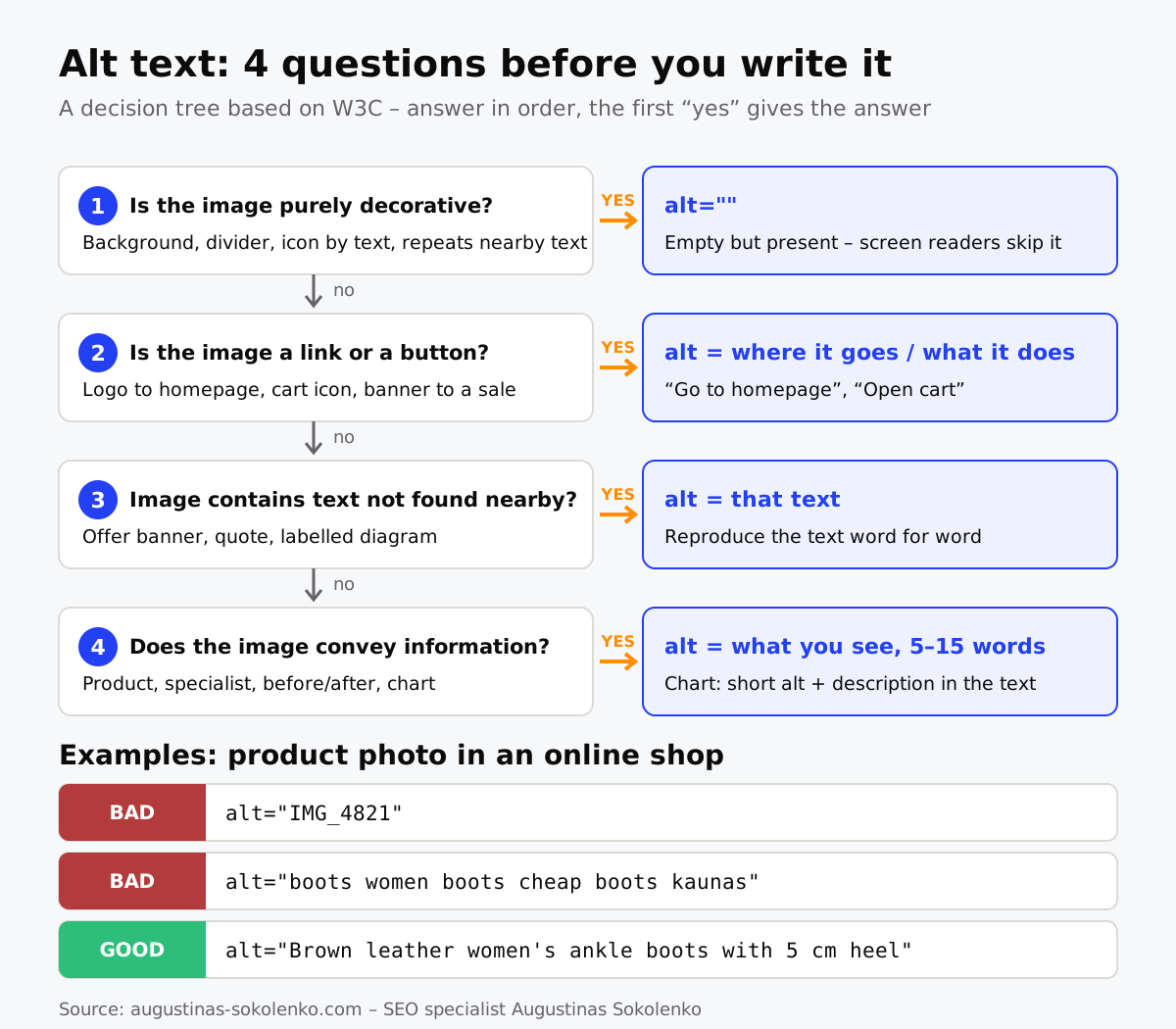
What goes into alt text is decided not by keywords but by the role the image plays on the page. The W3C (the web standards body) has a decision tree for this, which I have simplified to four questions: answer them in order, and the first „yes” gives you the answer.
1. Is the image purely decorative?
If yes, write alt="" – an empty but present attribute. A screen reader skips such an image, whereas without the attribute it would read out the file name. Decoration means backgrounds, dividers, the icon next to the word „Phone”, a photo that merely repeats the heading beside it.
This is where most SEO advice goes wrong: „fill in every alt text” means a blind visitor browsing a catalogue hears „blue background”, „decorative line”, „icon” after every product. The W3C decision tree is explicit: decoration gets an empty alt.
2. Is the image a link or a button?
If yes, the alt text should say where the link goes or what the button does, not what it looks like. The logo in the header that leads to the homepage gets alt="Go to homepage" or the company name; the cart icon gets alt="Open cart". According to Google’s documentation, in this case the alt text works as the link’s anchor text, so Google reads it the way it would read a text link.
3. Does the image contain text that is not found nearby?
If yes, the alt text should reproduce that text word for word. A sale banner reading „30 % off all footwear until Sunday” without alt text is an offer that part of your visitors and Google will never see. Better still, move the text out of the image into HTML, but if that is not possible, the alt repeats it.
4. Does the image convey information?
If yes, describe what you see in 5–15 words, in the context of the page. The same shot of boots on a page about leather care might be „leather ankle boots after waterproofing”, while on a product page it is „brown leather women’s ankle boots with 5 cm heel”. For a complex chart or infographic the alt text stays short („SEO audit process diagram: 5 stages”) and the information itself goes in the text below.
Google’s own example shows the full scale: alt="puppy" is better than nothing, but alt="Dalmatian puppy playing fetch" is what you are aiming for.
How does alt text affect SEO?
Alt text will not fundamentally change your rankings in regular web search, but it is the main signal for Google Images and one of the signals Google uses to understand what a page is about.
In practice the benefit shows up in three places. For online shops and services with a visual result (interiors, aesthetic medicine, construction), image search brings real traffic: someone searches „brown women’s ankle boots” in the Images tab and clicks through to the product. A product page without alt text loses that traffic entirely. Second, alt text confirms the page topic: if an article about sitemaps has images described as „example of an XML sitemap”, Google gets one more confirmation. Third, AI Overviews and chat assistants cite pages they can read in full, images included.
One boundary matters here: a keyword belongs in alt text only when it describes the image. alt="boots women boots cheap boots kaunas" is what Google’s documentation calls keyword stuffing, which can be treated as spam. If your image shows brown ankle boots, the keyword „women’s ankle boots” appears naturally, because you are simply describing it.
How to find missing alt text on your site
The fastest way to find missing alt text is a crawler: Screaming Frog (free up to 500 URLs) filters „Missing Alt Text” and „Alt Text Over 100 Characters” in its Images tab.
If you would rather not install tools, there are two simpler routes:
- The WordPress media library. In Media, switch to list view – the „Alt Text” column shows which files are empty. An alt changed in the library updates everywhere the image is inserted via a block; in hand-written HTML it stays as it was.
- The browser. On any page press F12, open the Console tab and type
document.querySelectorAll('img:not([alt])').length– you get the number of images without an alt attribute on that page. Change it toimg[alt=""]to see how many are marked as decorative.
Set priorities by traffic, not by count: product and service pages with the most impressions in Search Console first, then articles, then the archive. Describing a thousand old blog photos by hand rarely pays off; the top 50 pages almost always do. When I run an SEO audit, the alt text list comes together with page priorities by traffic.
Is alt text required by law?
Since 28 June 2025 Lithuania has had a Law on Accessibility Requirements for Products and Services, transposing the EU Accessibility Directive 2019/882, and e-commerce is one of the areas it covers. Text alternatives for non-text content, in other words alt text, are among the requirements.
The law does not apply to micro-enterprises (fewer than 10 employees and up to €2 million turnover), and enforcement sits with the State Consumer Rights Protection Authority. For a larger online shop this means alt text has moved from „nice to have” to a compliance matter: the law provides fines starting at €500 for offering non-compliant services. Public-sector websites were already subject to accessibility requirements (based on WCAG) before that.
Law aside, my arithmetic is simple: writing alt text for the 50 most important pages takes a few hours, while its absence costs image-search traffic, a share of visitors and one more line in every audit.
Frequently asked questions
How long should alt text be?
Usually 5–15 words, up to roughly 125 characters. Some screen readers cut longer text off, and Google’s documentation asks for short, descriptive text. If describing the image takes a paragraph, that is a sign the description belongs in the text under the image, not in the alt attribute.
Should I write „image” or „photo” in the alt text?
No. The screen reader already announces that it is an image, so „photo showing brown ankle boots” sounds to a blind visitor like „image: photo showing brown ankle boots”. Write only what is shown.
Can I use the same alt text for several images?
Only if the images really are identical, for example the same logo in the header and footer. Product photos from different angles should differ by at least one detail: „side view”, „sole”, „worn on foot”.
Does a logo need alt text?
Yes, if the logo is a link (usually to the homepage) – then the alt is the company name or „Go to homepage”. If the logo merely decorates the footer and the company name is written next to it, the alt can be empty.
Can AI generate alt text automatically?
It can, and for large catalogues it is a practical solution: WordPress and Shopify have plugins that describe images automatically. The output is worth reviewing at least for the key pages, because AI describes what it sees, not what the image means on your page – on a product page „woman wearing brown shoes” is a worse alt than „brown leather ankle boots with 5 cm heel”.
Where do I enter alt text in WordPress?
In two places: in the media library (the „Alternative Text” field, applied everywhere the file is inserted via a block) or directly in the image block in the editor, under „Alt text” in the right-hand panel. The block value takes precedence over the library value, so the same image can be described differently on different pages.